Server virtualization vs. storage virtualization

Functional Fusion? by Cain Novocaine (cc) (from Flickr)

One can only be perplexed by the seemingly overwelming adoption of server virtualization and contrast that with the ho-hum, almost underwelming adoption of storage virtualization.  Why is there this significant a difference?

I think the problem is partly due to the lack of an common understanding of storage performance utilization.

Why server virtualization succeeded

One significant driver of server virtualization is the precipitous drop in server utilization that occurred over the last decade when running single applications on a physical server.  It was nothing to see real processor utilization of less than 10% and consequently it was easy to envision that executing 5-10 applications on the single server. And what’s more each new generation of server kept getting more powerful, handling double the MIPs every 18 months or so driven by Moore’s law.

The other factor was that application workloads weren’t increasing that much. Yes new applications would come online but they seldom consumed an inordinate amount of MIPs and were often similar to what was already present. So application processing growth while not flatlining, was expanding at a relatively slow speed.

Why storage virtualization has failed

Data on the other hand continues its never ending exponential growth. Doubling every 3-5 years or less. And the fact that you have more data, almost always requires more storage hardware to support the IOPs being required to support it.

In the past the storage IOP rates was intrinsically tied to the number of disk heads available to service the load.  Although disk performance grew it wasn’t doubling every 18 months, and real per disk performance was actually going down over time, measured as the amount of IOPS per GB.

This drove proliferation of disk spindles and as such, storage subsystems in the data center. Storage virtualization couldn’t reduce the number of spindles required to support the workload.

Thus, if you look at storage performance from the perspective of % IOPS one could support per disk, most  sophisticated systems were running anywhere from 75% to 150% (based on DRAM caching).

Paradigm shift ahead

But SSDs can change this dynamic considerably.  A typical SSD can sustain 10-100K IOPs and there is some liklihood that this will increase with each generation that comes out but the application requirements will not increase as fast.  Hence, , there is a high liklihood that normal data center utilisation of SSD storage perfomance will start to drop below 50% or more, when that happens. -torage virtualization may start to make a lot more sense.

Maybe when (SSD) data storage starts moving more in line with Moore’s law, storage virtualization will become a more dominant paradigm for data center storage use.

—

Any bets on who the VMware of storage virtualization will be?

Comments?

Shared DAS

Code Name "Thumper" by richardmasoner (cc) (from Flickr)

An announcement this week by VMware on their vSphere  5 Virtual Storage Appliance has brought back the concept of shared DAS (see vSphere 5 storage announcements).

Over the years, there have been a few products, such as Seanodes and Condor Storage (may not exist now) that have tried to make a market out of sharing DAS across a cluster of servers.

Arguably, Hadoop HDFS (see Hadoop – part 1), Amazon S3/cloud storage services and most scale out NAS systems all support similar capabilities. Such systems consist of a number of servers with direct attached storage, accessible by other servers or the Internet as one large, contiguous storage/file system address space.

Why share DAS? The simple fact is that DAS is cheap, its capacity is increasing, and it’s ubiquitous.

Shared DAS system capabilities

VMware has limited their DAS virtual storage appliance to a 3 ESX node environment, possibly lot’s of reasons for this.  But there is no such restriction for Seanode Exanode clusters.

On the other hand, VMware has specifically targeted SMB data centers for this facility.  In contrast, Seanodes has focused on both HPC and SMB markets for their shared internal storage which provides support for a virtual SAN on Linux, VMware ESX, and Windows Server operating systems.

Although VMware Virtual Storage Appliance and Seanodes do provide rudimentary SAN storage services, they do not supply advanced capabilities of enterprise storage such as point-in-time copies, replication, data reduction, etc.

But, some of these facilities are available outside their systems. For example, VMware with vSphere 5 will supports a host based replication service and has had for some time now software based snapshots. Also, similar services exist or can be purchased for Windows and presumably Linux.  Also, cloud storage providers have provided a smattering of these capabilities from the start in their offerings.

Performance?

Although distributed DAS storage has the potential for high performance, it seems to me that these systems should perform poorer than an equivalent amount of processing power and storage in a dedicated storage array.  But my biases might be showing.

On the other hand, Hadoop and scale out NAS systems are capable of screaming performance when put together properly.  Recent SPECsfs2008 results for EMC Isilon scale out NAS system have demonstrated very high performance and Hadoops claim to fame is high performance analytics. But you have to throw a lot of nodes at the problem.

—–

In the end, all it takes is software. Virtualizing servers, sharing DAS, and implementing advanced storage features, any of these can be done within software alone.

However, service levels, high availability and fault tolerance requirements have historically necessitated a physical separation between storage and compute services. Nonetheless, if you really need screaming application performance and software based fault tolerance/high availability will suffice, then distributed DAS systems with co-located applications like Hadoop or some scale out NAS systems are the only game in town.

Comments?

vSphere 5 storage enhancements

Doyle on a Riemann Sphere by fdecomite (cc) (from Flickr)

Twitter was all abuzz yesterday about the recent VMware vSphere 5 announcement. Although there were quite a few changes that came out, the ones of most interest to me were all in the data storage arena:

  • DAS storage appliance – VMware vSphere 5 now has a virtual machine that can take server DAS and offer a shared storage service to other VMs.  The storage appliance is only available for the Essentials+ and below licensing options and is restricted to a three physical ESX server environment.
  • Host based replication service – vSphere 5 now offers a software only replication option to support disaster recovery.  The host-based replication service is not considered high-bandwidth and will not compete with storage or other hardware replication products but can be used to support heterogeneous storage replication.
  • Storage DRS – For vSphere 5 Enterprise edition and above once storage pools have been defined, Storage DRS can migrate VMs to other storage within a pool to automatically load balance IO activity.
  • Storage performance guarantees – For Enterprise edition and above vSphere 5 can provide a QOS capability for IO activity allowing designated, high priority VMs to gain preferential access to IO queues and such so that they perform better in a noisy, mixed environment.
  • IO performance improvements – VMware claims a 4X improvement in storage throughput with vSphere 5.
  • Linked clones – VMware now offers a storage option that can chain two read-writeable copies of a VMDK together and only store the changes needed for the second copy enabling quicker and more efficient storage provisioning for similar VMs.

DAS appliances have been around for awhile now but have never been really popular. However for smaller shops, this might be just the thing to help them start down the virtualization path.  Similarly the VMware host- based data replication is a low-end capability that might help these customers virtualize, although this may be a bit more sophisticated than most SMB data centers need.

Storage performance guarantees, DRS, and automatic provisioning seem to be targeted at the higher end shops with vast storage farms to manage.  Such shops would like to automate (as much as possible) some of the performance management, provisioning and service management that they currently need to do manually to ease VMware’s storage admins workloads.

Linked clones and IO performance improvements will benefit all shops. However, IO improvements should enable bigger more mission critical applications to be virtualized.  On the other hand, linked clones will help all customers quickly and more efficiently deploy lot’s of similar VMs.

——–

The big complaint on Twitter yesterday was on VMware’s licensing change. Apparently vSphere is licensed on a vRAM basis (the amount of virtual memory assigned to all VMs in a shop).  How this will impact customer costs is subject to debate but each vSphere processor license gets a certain amount of vRAM available to it (from 24GB to 48GB of vRAM per slot, depending on license level).

There’s been lot’s of talk about VASA and VAAI capabilities that are being rolled out by storage vendors but that will need to wait until another post.

Comments?

VMware’s CEO at EMCWorld

At EMCWorld earlier this week, Paul Maritz CEO of VMware took center stage and talked about what they were doing to help customers in their journey to the cloud. From his perspective, there seems to be 3 phases to the journey but it all starts with virtualization.

When companies start down this path they often start with virtualizing stuff they don’t have to ask to get virtualized.  Such things as file and print services are first to get virtualized and generally cap out at 20% of the servers being virtualized in the data center.  This ends phase 1.

After that, it gets harder

The trouble comes when IT is considered a tax on the rest of the business.  As such, there is little incentive from any application owner/business unit to make IT services more efficient.

Then the catalyst to further virtualization often is the failure of physical infrastructure.  IT quickly responds to such problems with virtualization as a temporary solution to getting the service back online.  But as the application owner sees the speed of response and provisioning with no concurrent loss in SLAs, applications are left on virtualized infrastructure.

Once one business unit takes the plunge with the advantages readily apparent, the rest follow.  Then the data center quickly goes from 20% to 60% virtualized.  This ends phase 2.

There wasn’t a lot if discussion on what it takes to go from 60% to 100% virtualized which he calls phase 3.  But everything VMware is rolling out new these days is to make that final transformation even easier.

VMware solutions to get data center 100% virtualized

It all starts with vSphere the management interface for a multitude of VMs that now populate the data center providing resource pooling and scheduling of virtualized machines on physical server environments.

Next comes vShield that surrounds these virtual machines with a logical security perimeter that can migrate along with the VM as it moves from server to server or from the data center to the cloud and back again.

Finally vCloud Director which provides for seamless movement of VMs from private to public cloud and back again.

As proof of all this becoming more important to the data center, Paul showed a slide where more and more of VMware’s automated services are being used in their biggest customer environments. For example, since 2008

  • the use of vMotion (VM migration) has gone from 53% to 86%
  • the use of HA (high availability) has gone from 41% to 74%
  • the use of DRS (dynamic resource scheduling) has gone from 37% to 64%
  • the use of storage vMotion (data migration) has gone from 27% to 65%
  • the use of Fault Tolerance has gone from N/A to 23%

Evidently, automation is becoming more important to many VMware customers.

Application development changes as well

But the transformation of applications will be even more significant. In the past, developers had to concern themselves with the complexity of O/S interfaces, physical hardware, networking and storage infrastructure and end-user interfaces.

But today developers have moved beyond these concerns to reduce the complexity in application development and by using technologies such as SpringSource, Ruby on Rails and other development frameworks. These frameworks are optimized for development and de-emphasize the compiling and physical optimizations needed in the past that today’s hardware no longer needs.

To this approach, now VMware adds an open source project they have been working on for some time called Cloud Foundry.  To become the new cloud O/S of the future one will now need only to code to Cloud Foundry services but then can operate anywhere on any cloud compatible infrastructure. The Foundry is released with Apache 2 open source license and is available to anyone to use.  [How does this differ from OpenStack?]

End-user computing changes

The final transformation is in the end-user computing delivery platform. As Paul said, the post-PC world has arrived.  Mobile environments are becoming more pervasive and thus, deploying computing/application services to these environments are taking higher priority from the more normal desktop deployments.

To this end, VMware is working on two projects Horizon and MVP.  Both of which are attempts to create easier end-device deployment.  One capability he discussed was a virtual smart phone that can be secured and deployed on any number of mobile devices providing a standard set of smart phone services that can be used by application developers to create one app for all smart phones [at least that’s the vision].

—-

I had taken notes at Paul’s keynote session but held off blogging about it until now as they didn’t seem to be anything specific on EMC announcements.

Comments?

Why Open-FCoE is important

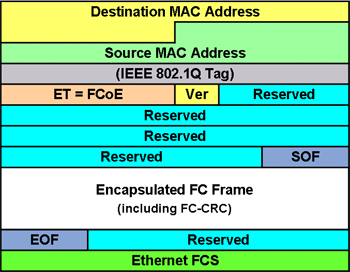
FCoE Frame Format (from Wikipedia, http://en.wikipedia.org/wiki/File:Ff.jpg)

I don’t know much about O/S drivers but I do know lots about storage interfaces. One thing that’s apparent from yesterday’s announcement from Intel is that Fibre Channel over Ethernet (FCoE) has taken another big leap forward.

Chad Sakac’s chart of FC vs. Ethernet target unit shipments (meaning, storage interface types, I think) clearly indicate a transition to ethernet is taking place in the storage industry today. Of course Ethernet targets can be used for NFS, CIFS, Object storage, iSCSI and FCoE so this doesn’t necessarily mean that FCoE is winning the game, just yet.

WikiBon did a great post on FCoE market dynamics as well.

The advantage of FC, and iSCSI for that matter, is that every server, every OS, and just about every storage vendor in the world supports them. Also there are plethera of economical, fabric switches available from multiple vendors that can support multi-port switching with high bandwidth. And there many support matrixes, identifying server-HBAs, O/S drivers for those HBA’s and compatible storage products to insure compatibility. So there is no real problem (other than wading thru the support matrixes) to implementing either one of these storage protocols.

Enter Open-FCoE, the upstart

What’s missing from 10GBE FCoE is perhaps a really cheap solution, one that was universally available, using commodity parts and could be had for next to nothing. The new Open-FCoE drivers together with the Intels x520 10GBE NIC has the potential to answer that need.

But what is it? Essentially Intel’s Open-FCoE is an O/S driver for Windows and Linux and a 10GBE NIC hardware from Intel. It’s unclear whether Intel’s Open-FCoE driver is a derivative of the Open-FCoe.org’s Linux driver or not but either driver works to perform some of the FCoE specialized functions in software rather than hardware as done by CNA cards available from other vendors. Using server processing MIPS rather than ASIC processing capabilities should make FCoE adoption in the long run, even cheaper.

What about performance?

The proof of this will be in benchmark results but it’s quite possible to be a non-issue. Especially, if there is not a lot of extra processing involved in a FCoE transaction. For example, if Open-FCoE only takes let’s say 2-5% of server MIPS and bandwidth to perform the added FCoE frame processing then this might be in the noise for most standalone servers and would showup only minimally in storage benchmarks (which always use big, standalone servers).

Yes, but what about virtualization?

However real world, virtualized servers is another matter. I believe that virtualized servers generally demand more intensive I/O activity anyway and as one creates 5-10 VMs, ESX server, it’s almost guaranteed to have 5-10X the I/O happening. If each standalone VM requires 2-5% of a standalone processor to perform Open-FCoE processing, then it could easily represent 5-7 X 2-5% on a 10VM ESX server (assumes some optimization for virtualization, if virtualization degrades driver processing, it could be much worse), which would represent a serious burden.

Now these numbers are just guesses on my part but there is some price to pay for using host server MIPs for every FCoE frame and it does multiply for use with virtualized servers, that much I can guarantee you.

But the (storage) world is better now

Nonetheless, I must applaud Intel’s Open-FCoE thrust as it can open up a whole new potential market space that today’s CNAs maybe couldn’t touch. If it does that, it introduces low-end systems to the advantages of FCoE then as they grow moving their environments to real CNAs should be a relatively painless transition. And this is where the real advantage lies, getting smaller data centers on the right path early in life will make any subsequent adoption of hardware accelerated capabilities much easier.

But is it really open?

One problem I am having with the Intel announcement is the lack of other NIC vendors jumping in. In my mind, it can’t really be “open” until any 10GBE NIC can support it.

Which brings us back to Open-FCoE.org. I checked their website and could see no listing for a Windows driver and there was no NIC compatibility list. So, I am guessing their work has nothing to do with Intel’s driver, at least as presently defined – too bad

However, when Open-FCoE is really supported by any 10GB NIC, then the economies of scale can take off and it could really represent a low-end cost point for storage infrastructure.

Unclear to me what Intel has special in their x520 NIC to support Open-FCoE (maybe some TOE H/W with other special sauce) but anything special needs to be defined and standardized to allow broader adoption by other Vendors. Then and only then will Open-FCoE reach it’s full potential.

—-

So great for Intel, but it could be even better if a standardized definition of an “Open-FCoE NIC” were available, so other NIC manufacturers could readily adopt it.

Comments?

Is cloud computing/storage decentralizing IT, again?

IBM Card Sorter by Pargon (cc) (From Flickr)

Since IT began, over the course of years, computing services have run through massive phases of decentralization out to departments followed by consolidation back to the data center.  In the early years of computing, from the 50s to the 60s, the only real distributed solution to mainframe or big iron data processing was sophisticated card sorters.

Consolidation-decentralization Wars

But back in the 70s the consolidation-decentralization wars were driven by the availability of mini-computers competing with mainframes for applications and users.  During the 80s, the PC emerged to become the dominant decentralizer taking applications away from mainframes and big servers and in the 90s it was small, off-the-shelf linux servers and continuing use of high-powered PCs that took applications out from data center control.

In those days it seemed that most computing decentralization was driven by the ease of developing applications for these upstarts and the relative low-cost of the new platforms.

Server virtualization, the final solution

Since 2000, another force has come to solve the consolidation quandry – server virtualization.  With server virtualization such as from VMware, Citrix and others, IT has once again driven massive consolidation outlying departmental computing services to bring them all, once again, under one roof, centralizing IT control.  Virtualization provided an optimum answer to the one issue that decentralization could never seem to address – utilization efficiency.  With most departmental servers being used at 5-10% utilization, virtualzation offered demonstrable cost savings when consolidated onto data center hardware.

Cloud computing/storage mutiny

But with the insurrection that is cloud computing and cloud storage once again, departments can easily acquire storage and computing resources on demand and utilization is no longer an issue because it’s a “pay only for what you use” solution. And they don’t even need to develop their own applications because SaaS providers can supply most of their application needs using cloud computing and cloud storage resources alone.

Virtualization was a great solution to the poor utilization of systems and storage resources. But with the pooling available with cloud computing and storage, utilization effectiveness occurs outside the bounds of the todays data center.  As such, with cloud services utilization effectiveness in $/MIP or $/GB can be approximately equivalent to any highly virtualized data center infrastructure (perhaps even better).  Thus, cloud services can provide these very same utilization enhancements at reduced costs out to any departmental user without the need for centralized data center services.

Other decentralization issues that cloud solves

Traditionally, the other problems with departmental computing services were lack of security and the unmanageability distributed service both of which held back some decentralization efforts but these are partially being addressed with cloud infrastructure today.  Insecurity continues to plague cloud computing but some cloud storage gateways (see Cirtas Surfaces and other cloud storage gateway posts) are beginning to use encryption and other cryptographic techniques to address these issues.  How this is solved for cloud computing is another question (see Securing the cloud – Part B).

Cloud computing and storage can be just as diffuse and difficult to manage as a proliferation of PCs or small departmental linux servers.  However, such unmanage-ability is a very different issue, one intrinsic to decentralization and much harder to address.  Although it’s fairly easy to get a bill for any cloud services, it’s unclear whether IT will be able to see all of them to manage it.  Also, nothing seems able to stop some department from signing up for SalesForce.com or even to use Amazon EC2 to support an application they need.  The only remedy, as far as I can see to this problem, is adherence to strict corporate policy and practice.  So unmanageability remains an ongoing issue for decentralized computing for some time to come.

—-

Nonetheless, it seems as if decentralization via the cloud is back, at least until the next wave of consolidation hits.  My guess for the next driver of consolidation is to make application development much easier and quicker to accomplish for centralized data center infrastructure – application frameworks anyone?

Comments?

CommVault’s Simpana 9 release

CommVault annoucned a new release of their data protection product today – Simpana® 9.  The new software provides significantly enhanced support for VM backup, new source-level deduplication capabilities and other enhanced facilities.

Simpana 9 starts by defining 3 tiers of data protection based on their Snapshot Protection Client (SPC):

  • Recovery tier – using SPC application consistent hardware snapshots can be taken utilizing storage interfaces to create content aware granular level recovery.  Simpana 9 SPC now supports EMC, NetApp, HDS, Dell, HP, and IBM (including LSI) storage snapshot capabilities.  Automation supplied with Simpana 9 allows the user to schedule hardware snapshots at various intervals throughout the day such  that they can be used to recover data without delay.
  • Protection tier – using mounted snapshot(s) provided by SPC above, Simpana 9 can create an extract or physical backup set copy to any disk type (DAS, SAN, NAS) providing a daily backup for retention purposes. This data can be deduplicated and encrypted for increased storage utilization and data security.
  • Compliance tier – selective backup jobs can then be sent to cloud storage and/or archive appliances such as HDS HCP or Dell DX for long term retention and compliance, preserving CommVault’s deduplication and encryption.  Alternatively, compliance data can be sent to the cloud.  CommVault’s previous cloud storage support included Amazon S3, Microsoft Azure, Rackspace, Iron Mountain and Nirvanix, with Simpana 9, they now add EMC Atmos providers and Mezeo to the mix.

Simpana 9 VM backup support

Simpana 9 also introduces a SnapProtect Enable Virtual Server Agent (VSA) to speed up virtual machine datastore backups.  With VSA’s support for storage hardware snapshot backups and VMware facilities to provide application consistent backups, virtual server environments can now scale to 1000s of VMs without concern for backup’s processing and IO impact to ongoing activity.  VSA snapshots can be mounted afterwards to a proxy server and using VMware services extract file level content which CommVault can then data deduplicate, encrypt and offload to other media that allows for granular content recovery.

In addition, Simpana 9 supports auto-discovery of virtual machines with auto-assignment of data protection policies.  As such, VM guests can be automatically placed into an appropriate, pre-defined data protection regimen without the need for operator intervention after VM creation.

Also with all the meta-data content cataloguing, Simpana 9 now supplies a light weight file-oriented Storage Resources Manager capability via the CommVault management interface.  Such services can provide detailed file level analytics for VM data without the need for VM guest agents.

Simpana 9 new deduplication support

CommVault’s 1st gen deduplication with Simpana 7 was at the object level.  With Simpana 8 deduplication occured at the block level providing content aware variable block sizes and added software data encryption support for disk or tape backup sets.  With today’s release, Simpana 9 shifts some deduplication processing out to the source (the client) increasing backup data throughput by reducing data transfer. All this sounds similar to EMC’s Data Domain Boost capability introduced earlier this year .

Such a change takes advantage of the CommVault’s intelligent Data Agent (iDA) running in the clients to provide pre-deduplication hashing and list creation rather than doing this all at CommVault’s Media Agent node, reducing data to be transferred.  Further, CommVault’s data deduplication can be applied across a number of clients for a global deduplication service that spans remote clients as well as a central data center repositories.

Simpana 9 new non-CommVault backup reporting and migration capabilities

Simpana 9 provides a new data collector for NetBackup versions 6.0, 6.5, and 7.0 and TSM 6.1 which allows CommVault to discover other backup services in the environment, extract backup policies, client configurations, job histories, etc. and report on these foreign backup processes.  In addition, once their data collertor is in place, Simpana 9 also supports automated procedures that can roll out and convert all these other backup services to CommVault data protection over a weekend, vastly simplifying migration from non-CommVault to Simpana 9 data protection.

Simpana 9 new software licensing

CommVault is also changing their software licensing approach to include more options for capacity based licensing. Previously, CommVault supported limited capacity based licensing but mostly used CommVault architectural component level licensing.  Now, they have expanded the capacity licensing offerings and both licensing modes are available so the customer can select whichever approach proves best for them.  With CommVault’s capacity-based licensing, usage can be tracked on the fly to show when customers may need to purchase a larger capacity license.

—

Probably other enhancements I missed here as Simpana 9 was a significant changeover from Simpana 8. Nonetheless, this version’s best feature was their enhanced approach to VM backups, allowing more VMs to run on a single server without concern for backup overhead.  The fact that they do source-level pre-deduplication processing just adds icing to the cake.

What do you think?

Hitachi’s VSP vs. VMAX

Today’s announcement of Hitachi’s VSP brings another round to the competition between EMC and Hitachi/HDS in the enterprise. VSP’s recent introduction which is GA and orderable today, takes the rivalry to a whole new level.

I was on SiliconANGLE‘s live TV feed earlier today discussing the merits of the two architectures with David Floyer and Dave Vellante from Wikibon. In essence, there seems to be a religious war going on between the two.

Examining VMAX, it’s obviously built around a concept of standalone nodes which all have cache, frontend, backend and processing components built in. Scaling the VMAX, aside from storage and perhaps cache, involves adding more VMAX nodes to the system. VMAX nodes talk to one another via an external switching fabric (RapidIO currently). The hardware although sophisticated packaging, IO connection technology and other internal stuff looks very much like a 2U server one could purchase from any number of vendors.

On the other hand, Hitachi’s VSP is a special built storage engine (or storage computer as Hu Yoshida says). While the architecture is not a radical revision of USP-V, it’s a major upleveling of all component technology from the 5th generation cross bar switch, the new ASIC driven Front-end and Back-end directors, the shared control L2 cache memory and the use of quad core Xenon Intel processors. Much of this hardware is unique, sophistication abounds and looks very much like a blade system for the storage controller community.

The VSP and VMAX comparison is sort of like a open source vs. closed source discussion. VMAX plays the role of open source champion that largely depends on commodity hardware, sophisticated packaging but with minimal ASICs technology. As evidence of the commodity hardware VPLEX EMC’s storage virtualization engine reportedly runs on VMAX hardware. Commodity hardware lets EMC ride the technology curve as it advances for other applications.

Hitachi VSP plays the role of closed source champion. Its functionality is locked inside proprietary hardware architecture, ASICS and interfaces. The functionality it provides is tightly coupled with their internal architecture and Hitachi probably believes that by doing so they can provide better performance and more tightly integrated functionality to the enterprise.

Perhaps this doesn’t do justice to either development team. There is plenty of unique proprietary hardware and sophisticated packaging in VMAX but they have taken the approach of separate but equal nodes. Whereas Hitachi has distributed this functionality out to various components like Front-end directors (FEDs), backend directors (BEDs), cache adaptors (CAs) and virtual storage directors (VSDs), each of which can scale independently, i.e., doesn’t require more BEDs to add FEDs or CAs. Ditto for VSDs. Each can be scaled separately up to the maximum that can fit inside a controller chasis and then if needed, you can add a whole another controller chasis.

One has an internal switching infrastructure (the VSP cross bar switch) and the other uses external switching infrastructure (the VMAX RapidIO). The promise of external switching like commodity hardware, is that you can share the R&D funding to enhance this technology with other users. But the disadvantage is that architecturally you may have more latency to propagate an IO to other nodes for handling.

With VSP’s cross bar switch, you may still need to move IO activity between VSDs but this can be done much faster and any VSD can access any CA, BED, FED resource required to perform the IO so the need to move IO is reduced considerably. Thus, providing a global pool of resources that any IO can take advantage of.

In the end, blade systems like VSP or separate server systems like VMAX, can all work their magic. Both systems have their place today and in the foreseeable future. Where blades servers shine is in dense packaging, high power cooling efficiency and bringing a lot of horse power to a small package. On the other hand, server systems are simple to deploy and connect together with minimal limitations on the number of servers that can be brought together.

In a small space blade systems probably can bring more compute (storage IO) power to bear within the same volume than multiple server systems but the hardware is much more proprietary and costs lots of R&D $s to maintain leading edge capabilities.

Typed this out after the show, hopefully I characterized the two products properly. If I am missing anything please let me know.

[Edited for readability, grammar and numerous misspellings – last time I do this on an iPhone. Thanks to Jay Livens (@SEPATONJay) and others for catching my errors.]